
Responsys Integration
Covers configuring Justuno to add emails to a selected List in Responsys
Instructions
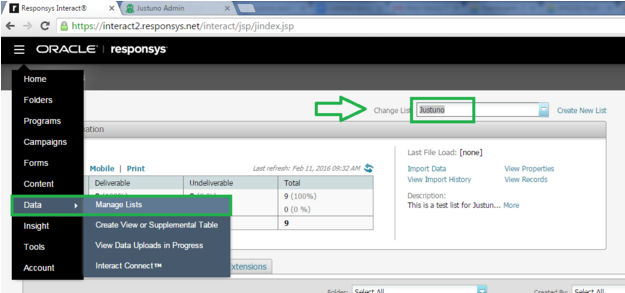
- Log in to your Responsys account and note two items to be used later:
a. Your login URL. This will be https://interact2 or https://interact5
b. Copy your desired List name as it appears here:
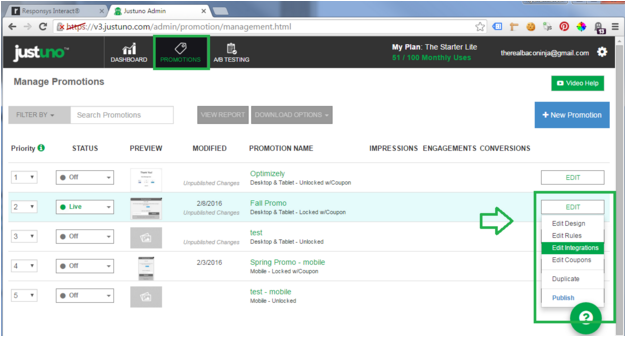
- Log in to Justuno and navigate to Promotions > Edit Integrations.
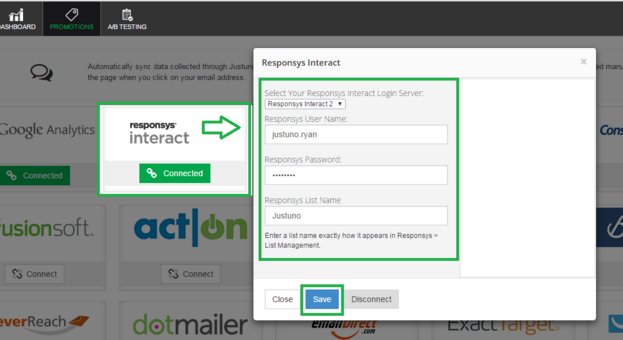
- Locate the Responsys tile and click “Connect”.
a. Select your Responsys Login server from Step 1 above.
b. Enter your Responsys username.
c. Enter your Responsys password.
d. Enter your Responsys List Name as it appears in Step 1 above.
e. Click “Save”
Justuno will now sync new signups to your selected Responsys list as they come in!